Imaging is a rapidly advancing field. An important new technology is High Efficiency File Format, or HEIF, developed to replace the aging JPEG standard by offering higher quality photos at a fraction of the file size.
The former is a protocol, while the latter is a file displayed on your device.
- HEIF: This is the format standard developed by the Moving Picture Experts Group (MPEG). It is a structural blueprint for how image data is organized.
- HEIC (High Efficiency Image Coding): This is the file extension (.heic) that is used. When Apple adopted HEIF as their standard photo format starting with iOS 11, they chose to compress the images using the highly efficient HEVC (H.265) video codec.
HEIF is the underlying technology, while HEIC is now the specific file type created when that tool is applied to your photos. Codec is term for "code/decode," used to describe methods for storing and playing large media files.
JPEG has been the internet standard since 1992, but it's showing its age. HEIF/HEIC improves upon it in several measurable ways. HEIC files use advanced compression tools adopted from video streaming. Because of this, an HEIC file takes up roughly 50% less storage space than a JPEG of the equivalent quality.
Despite being smaller, HEIC files actually store more visual data than JPEGs:
- Color Depth: JPEGs are limited to 8-bit color (16.7 million colors). HEIC supports up to 16-bit color, which means smoother gradients, more realistic shadows, and no "color banding" artifacts in skies or sunsets.
- Better Highlights/Shadows: It natively supports High Dynamic Range (HDR), preserving details in very bright or dark areas of a photo. HDR is at the heart of Computational Photography, which optimizes sensor data by using selected components of image layers.
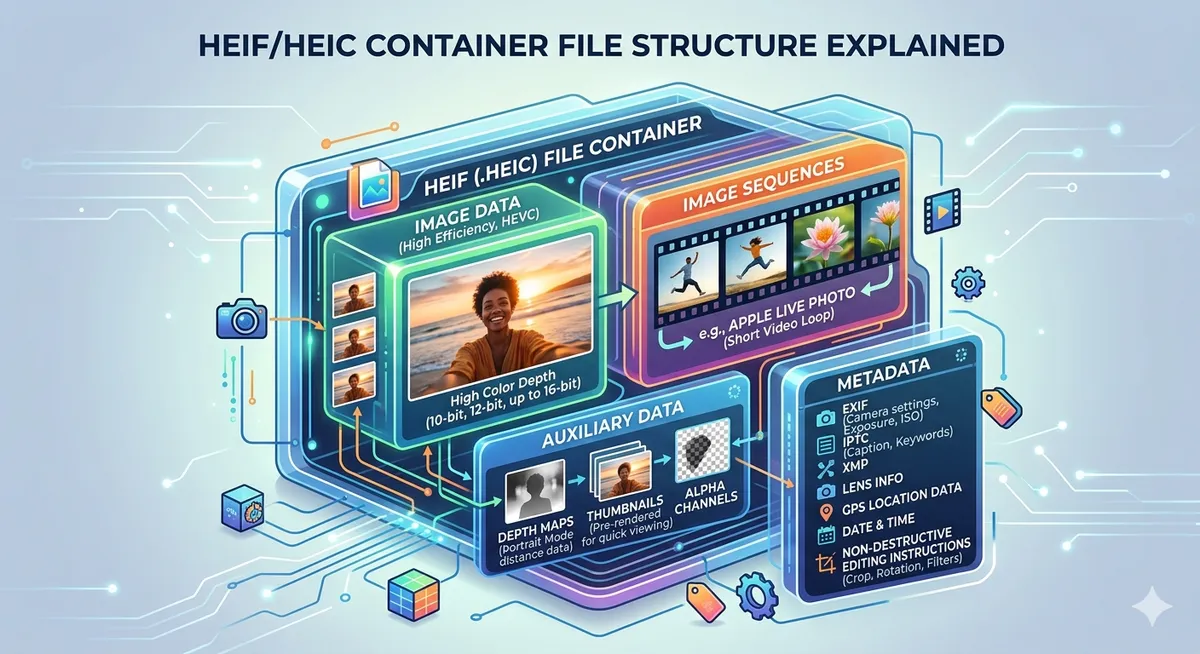
A JPEG can only hold one single image. HEIF is a container format, meaning a single .heic file can bundle multiple pieces of data together.
- Image Sequences: This is how Apple stores Live Photos (a burst of photos combined with a mini-video) inside a single file.
- Depth Maps: When you take a Portrait Mode photo, the file saves the background blur data separately. This allows you to adjust the blur intensity long after the photo is taken.
- Non-Destructive Edits: If you crop or rotate an HEIC image, the file remembers the original data. You can revert to the original photo at any time.